Native Word Grid
Native Microsoft Word Tables
Converts table images directly into genuine Word tables (w:tbl) so you can resize columns, add rows, and adjust cell styling.
Turn scanned PDFs, images, and document pages with tables into cleanly structured Microsoft Word (.docx) files. DocMorphix preserves rows, columns, merged headers, and cell formatting.
Upload scans, images, or PDFs containing structured tables (PDF, PNG, JPG).
Handles financial statements, pricing schedules, invoices, clinical trials, multi-line cells, and borderless tables.
Traditional OCR tools do not recognize two-dimensional tables as structured grids. Instead, they read tables as horizontal ribbons of text separated by spaces or broken tabs. When imported into Microsoft Word, cell values shift into wrong columns, multi-line descriptions truncate, numeric decimals misalign, and multi-tier merged headers are completely destroyed.
DocMorphix applies advanced table structure recognition (TSR). It identifies table boundaries, maps row and column coordinates, reconstructs cell spans (rowspan and colspan), and generates true, editable native Word tables with clean borders, aligned columns, and proportional widths.
Need an in-depth tutorial? Read our guide on how to convert image tables to editable Word tables →
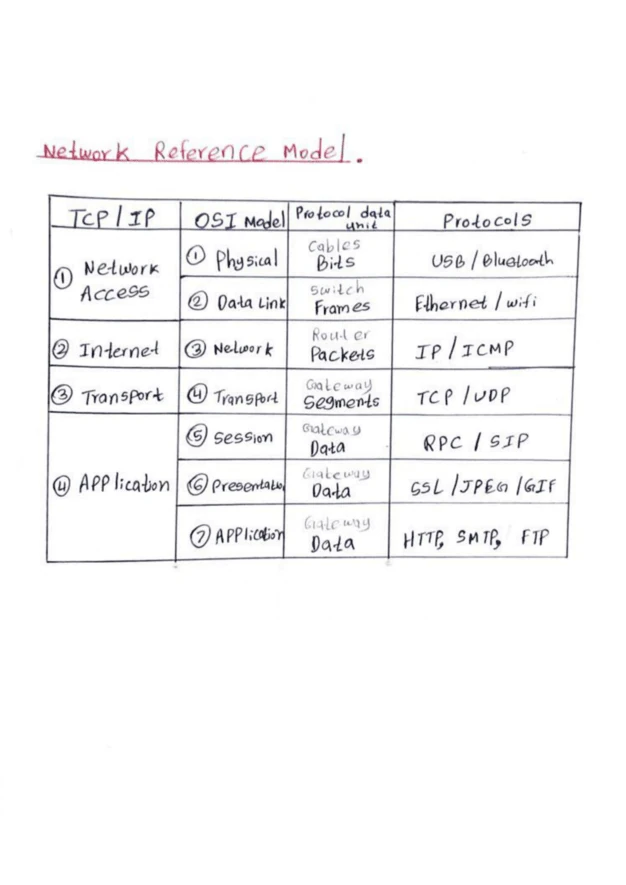
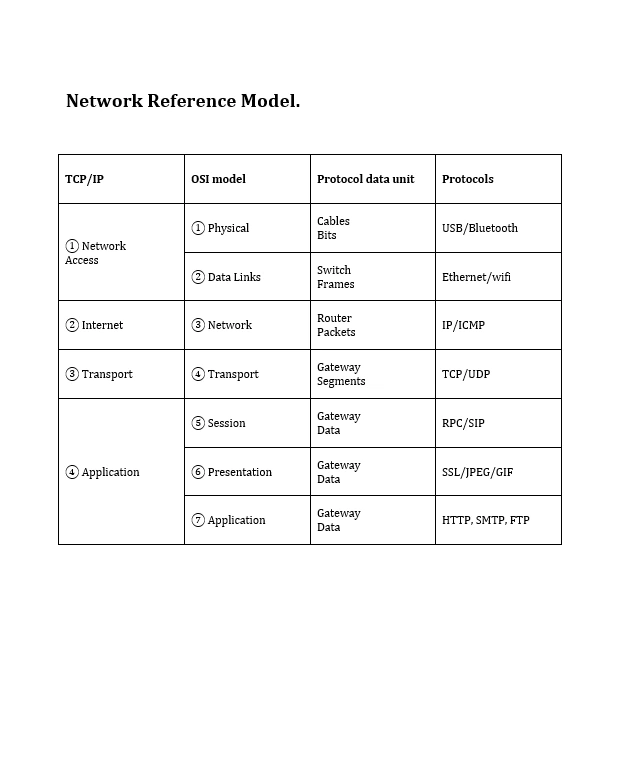
Compare a photographed document table with the clean, editable structured table generated by DocMorphix in Microsoft Word.
Scanned document with financial/data table and mixed columns
Reconstructed native Word table with clean rows, columns, and styling
Results can vary
Table extraction fidelity depends on scan sharpness and table clarity. DocMorphix reliably reconstructs complex grids, though heavily distorted or curved camera photos may benefit from minor column width adjustments.
Extract and reconstruct complex tables into editable Microsoft Word documents in seconds.
Upload your scanned PDF, screenshot, or document photo featuring single or multi-page tables.
DocMorphix analyzes gridlines, cell intersections, merged headers, and text alignment to rebuild the table matrix.
Open your native Microsoft Word (.docx) file with fully editable tables, rows, columns, and styles intact.
Engineered to preserve table integrity, typography, and mathematical data alignment.
Converts table images directly into genuine Word tables (w:tbl) so you can resize columns, add rows, and adjust cell styling.
Detects complex multi-row and multi-column headers (rowspan and colspan) commonly used in financial and scientific tables.
Recognizes tables even when grid lines are faint, dotted, or completely invisible by analyzing whitespace geometry.
Preserves decimal alignment, currency symbols, and negative indicator parentheses across financial data columns.
Keeps lengthy text descriptions confined to their proper cell with natural word wrapping instead of breaking into new table rows.
Because the output is a standard structured Word table, you can easily copy and paste it into Microsoft Excel without data scrambling.
From balance sheets to scientific research, reconstruct tabular data without manual re-entry.
Convert scanned annual reports, income statements, balance sheets, and audit filings into editable Word documents.
Extract line items, quantities, unit prices, tax amounts, and totals into neat tabular formats.
Digitize experimental data tables, chemical measurement grids, and statistical research findings.
Turn scanned manufacturer price sheets, SKU tables, and equipment specification matrices into editable tables.
Reconstruct census data, KPI dashboards, and municipal budget tables into shareable, modifiable reports.
Convert patient cohort tables, dosage schedules, and clinical trial results into compliant Word documentation.
Answers to frequently asked questions about converting scanned tables and documents into editable Microsoft Word tables.
Yes. DocMorphix uses table structure recognition (TSR) to identify rows, columns, and headers, converting them into true, editable Microsoft Word table objects rather than static images or tab-separated text.
DocMorphix offers dedicated converters for challenging document elements.
Convert multi-page scanned PDFs into editable Word documents with full layout preservation.
Convert JPG, PNG, and photographed documents into formatted Microsoft Word files.
Reconstruct mathematical and technical formulas into native editable Word equations.
Stop retyping table data cell by cell. Upload your scanned document, PDF, or image to generate an editable Word table in seconds.