Native OMML
Native Word Equations
Reconstructs mathematical formulas as true Microsoft Word Equation objects (OMML) so you can edit variables and operators directly.
Convert scanned PDFs, images, and technical documents containing mathematical formulas into editable Microsoft Word (.docx) files. Reconstruct complex equations into native Word equation objects.
Upload scanned PDFs, math problem sheets, or technical papers (PDF, PNG, JPG).
Supports calculus, algebra, statistics, physics notation, fractions, square roots, integrals, matrices, and Greek symbols.
Standard OCR software is built for linear alphabetic text. When confronted with two-dimensional mathematical expressions, it treats formulas as broken strings of disconnected characters: multi-tier fractions collapse into misplaced slash marks, superscripts and subscripts turn into standard letters, and symbols like integrals (∫), summations (∑), and square roots (√) become scrambled noise.
DocMorphix features dedicated mathematical syntax analysis. It understands hierarchical formula grammar recognizing numerators, denominators, power exponents, limits, indices, and matrix layouts and converts them into native, editable Microsoft Word Equation structures rather than static flat screenshots.
Curious about OMML and equation reconstruction? Read our in-depth equations guide →
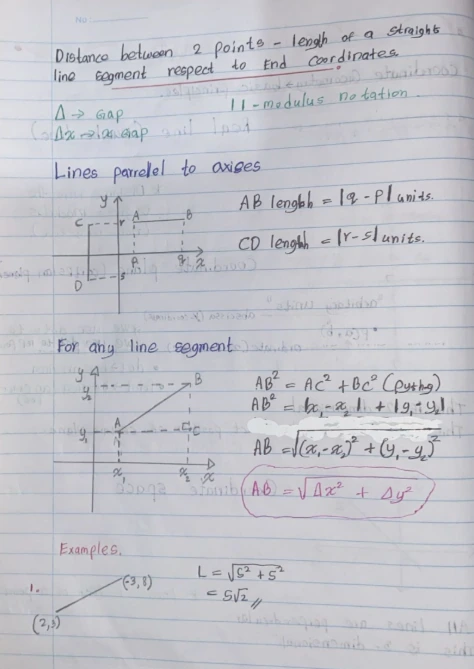
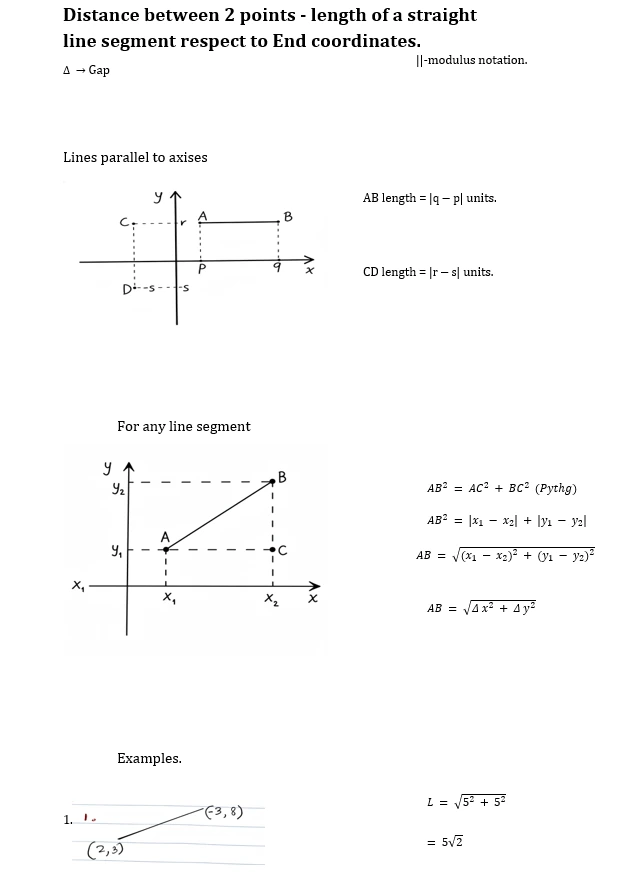
Examine how a photographed document with mathematical formulas converts into editable Microsoft Word content.
Scanned worksheet with complex mathematical formulas
Reconstructed document with editable Word equations and clean formatting
Results can vary
Reconstruction accuracy depends on formula clarity, resolution, and scan quality. Extremely dense handwriting or faded print may require slight manual syntax correction in Word.
Turn mathematical and technical papers into editable Word equations effortlessly.
Select your scanned PDF, worksheet image, or photographed technical paper containing mathematical content.
Our engine separates plain text from equations, parses operators, Greek symbols, and fractions, and builds equation trees.
Export as a Microsoft Word (.docx) file where formulas can be edited using the built-in Word Equation Editor.
DocMorphix restores mathematical structures accurately across academic, scientific, and engineering documents.
Reconstructs mathematical formulas as true Microsoft Word Equation objects (OMML) so you can edit variables and operators directly.
Accurately detects upper and lower bounds on definite integrals, summations, products, and limit expressions.
Preserves nested fractions, radicals, square roots, power exponents, and multi-level subscript indices without collapsing.
Distinguishes Greek letters (α, β, θ, λ, ω), partial differentials (∂), arrows (→), and specialized mathematical glyphs.
Maintains inline equations smoothly within sentences while keeping standalone, numbered display equations centered.
Reconstructs matrix brackets, determinants, linear algebra vectors, and curly-bracket piecewise functions.
Save dozens of hours recreating equations and technical formulas from scratch.
Convert arXiv preprints, journal articles, and thesis papers into editable Word documents for revising or citing.
Digitize chapters from mathematics, physics, and chemistry textbooks into editable classroom notes and problem sets.
Reconstruct lab manuals, technical specifications, and thermodynamic reports with mixed diagrams and equations.
Turn scanned math exams, quizzes, and problem sets into editable Word tests for educators and students.
Re-create manuscripts originally published or scanned into Word format meeting modern academic publishing standards.
Extract complex probability functions, linear regression formulas, and statistical proofs into Word documents.
Frequently asked questions about converting documents containing mathematical equations into editable Word files.
Traditional OCR cannot handle mathematical equations because formulas are two-dimensional and hierarchical. DocMorphix uses specialized mathematical structure recognition models that parse syntax, operators, and symbols to rebuild formulas.
DocMorphix provides precision tools for every complex document type.
Convert multi-page scanned PDF documents into editable Word documents with full structure preservation.
Reconstruct complex structured data, financial sheets, and scientific tables without losing cell formatting.
Convert hand-drawn diagrams, engineering schematics, and flowcharts into clean digital formats.
Stop retyping complex math formulas by hand. Upload your technical document or math scan to get an editable Word document with real equations.