Vision Engine
AI Diagram Reconstruction
Neural vision model identifies diagram structure, straightening freehand strokes and clarifying geometry into clean illustrations.
Turn hand-drawn sketches, scanned diagrams, and flowcharts into clean digital graphics with AI. Upload an image, choose a reconstruction style, and download your result.
Or click to browse files (JPG, PNG, WEBP up to 20MB)
Photographed sketches, whiteboard captures, and scanned diagrams often suffer from uneven lines, blurry labels, low contrast, and distracting paper textures. Pasting raw photos directly into client decks, documentation, or reports looks unpolished.
DocMorphix analyzes the geometry and relationships within your source drawing, reconstructing rough strokes into clean, digital illustrations ready to download and share.
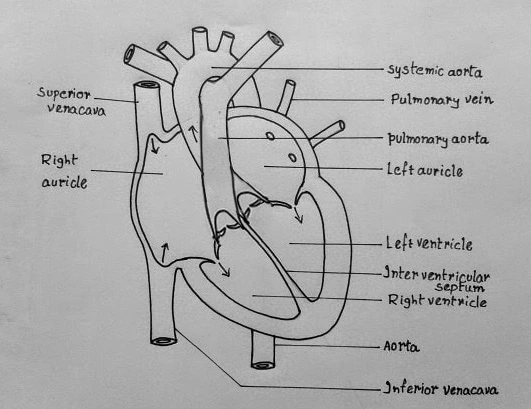
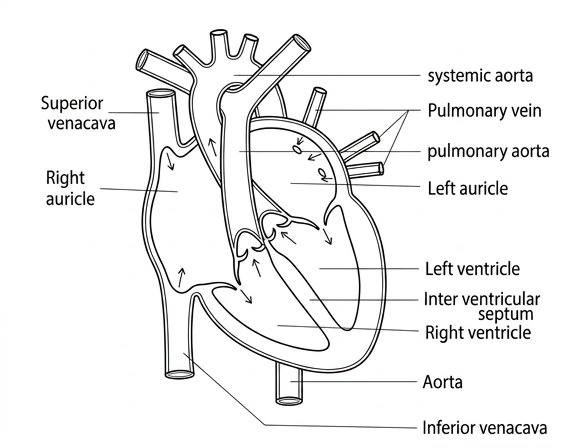
Inspect how a photographed diagram sketch transforms into clean, high-resolution digital styles.
Original hand-drawn diagram on paper
Clean digital reproduction with straightened lines
Results can vary
Output quality depends on sketch clarity and line contrast. DocMorphix cleans up freehand strokes and geometry, though low-contrast drawings or dense annotations may benefit from prompt refinement.
Turn rough drawings and whiteboard photos into clean digital graphics in three simple steps.
Select or drop any photo or scan of a hand-drawn sketch, whiteboard drawing, or low-resolution flowchart (PNG, JPG, or WEBP).
Pick from Digitalized, Vectorized, Enhanced, or Clean Sketch depending on your documentation or presentation aesthetic.
Adjust details with natural language prompts if desired, then export your graphic as scalable SVG, high-resolution PNG, or JPEG.
Designed to turn rough visual concepts into clean, presentation-ready illustrations.
Neural vision model identifies diagram structure, straightening freehand strokes and clarifying geometry into clean illustrations.
Choose from clean Digitalized, flat Vectorized, 3D Enhanced, or minimalist Clean Sketch to match your document and presentation aesthetic.
Fine-tune color schemes, adjust line weights, or modify specific visual elements with natural language instructions after generation.
Export scalable SVG vector wrappers, high-resolution transparent PNG images for slide decks, or web-optimized JPEG files.
From notebook ideas to classroom boards, convert rough drawings into clean visual assets.
Turn paper notebook drawings, quick brainstorming notes, and whiteboard sessions into crisp digital illustrations ready to share with teams or clients.
Convert hand-drawn decision trees, process maps, and system workflows into structured digital graphics with aligned connections.
Digitize biology and anatomical sketches, math diagrams, and classroom blackboard drawings into clear illustrations for study materials.
Answers to common questions about converting hand-drawn sketches and scanned diagrams into digital formats.
Diagram reconstruction is the process of analyzing hand-drawn sketches, whiteboard captures, or low-resolution diagram images and transforming them into clean, high-resolution digital illustrations and scalable graphics with straightened lines and consistent visual styling.
Looking for tips on capturing sketches and choosing the best output style? Read our complete diagram digitization tutorial →
Specialized AI document reconstruction tools built for difficult document layouts, equations, and formats.
Convert multi-page scanned PDF documents into fully editable Word documents with preserved layouts.
Convert document photos, screenshots, and JPG/PNG files to formatted Word documents.
Reconstruct complex mathematical formulas and calculus equations into editable Word objects.
Upload your hand-drawn sketch or diagram photo at the top of the page to generate clean digital graphics in seconds.